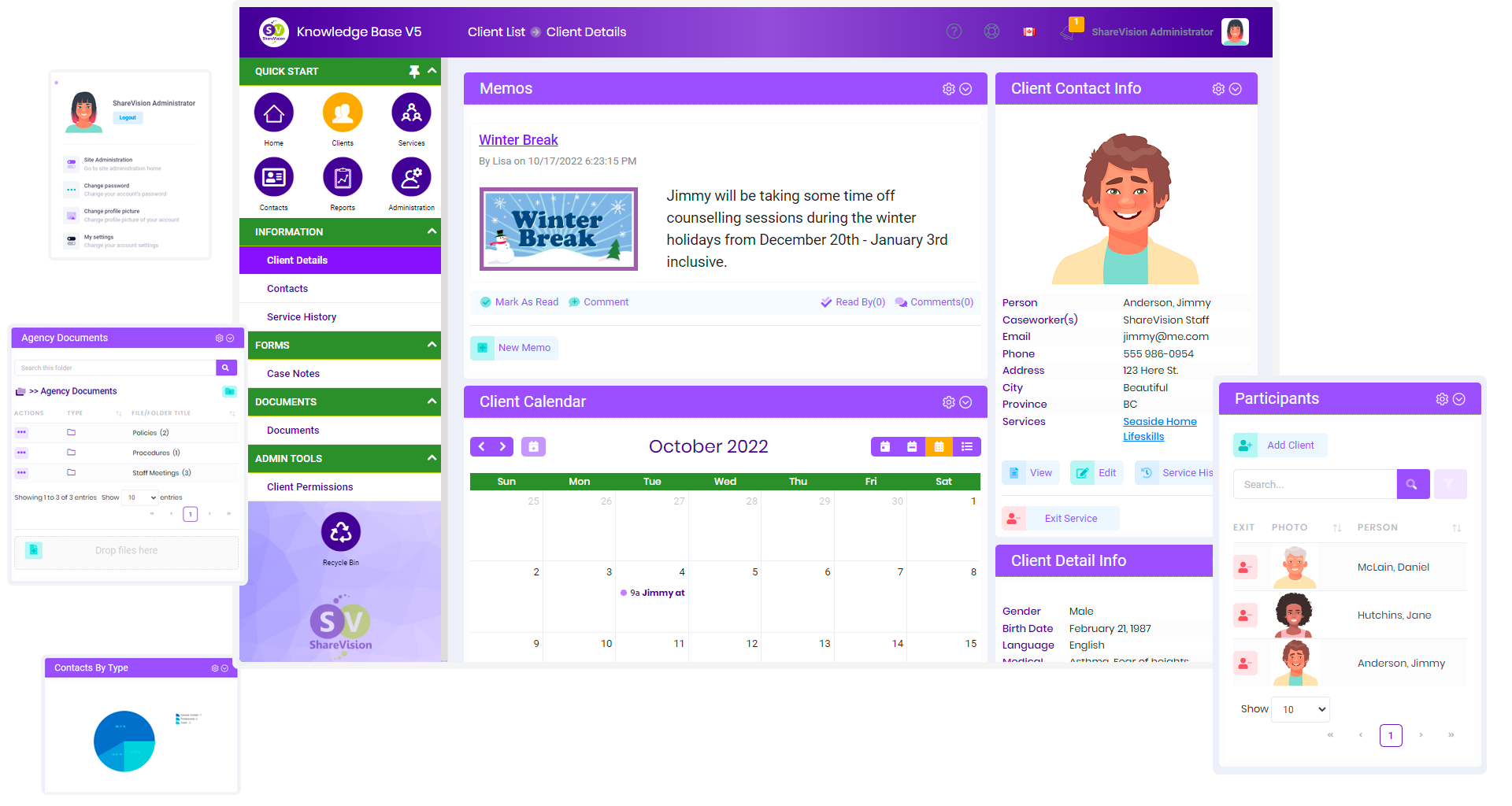
The nonprofit CRM that helps social service agencies serve better.
ShareVision gives your team one secure place to manage client records, document needs, track goals and outcomes, automate follow-ups, organize staff workflows, and report on the work your organization delivers every day.
Discover ShareVision Simply and Plenty Our newest solutions for nonprofit organizations
Experience the Best in Nonprofit CRM for Social Service Agencies
Unveil the leading digital platform for small social service entities with ShareVision. Tailored for nonprofits, ShareVision simplifies creating collaborative online environments for enhanced interaction and tracking. Revolutionize your social service initiatives using ShareVision's intuitive tools.
Feel the impact of ShareVision: Your ultimate nonprofit CRM.

ShareVision: Your CRM Solution for Easier Nonprofit Management

Client Tracking
Client Tracking
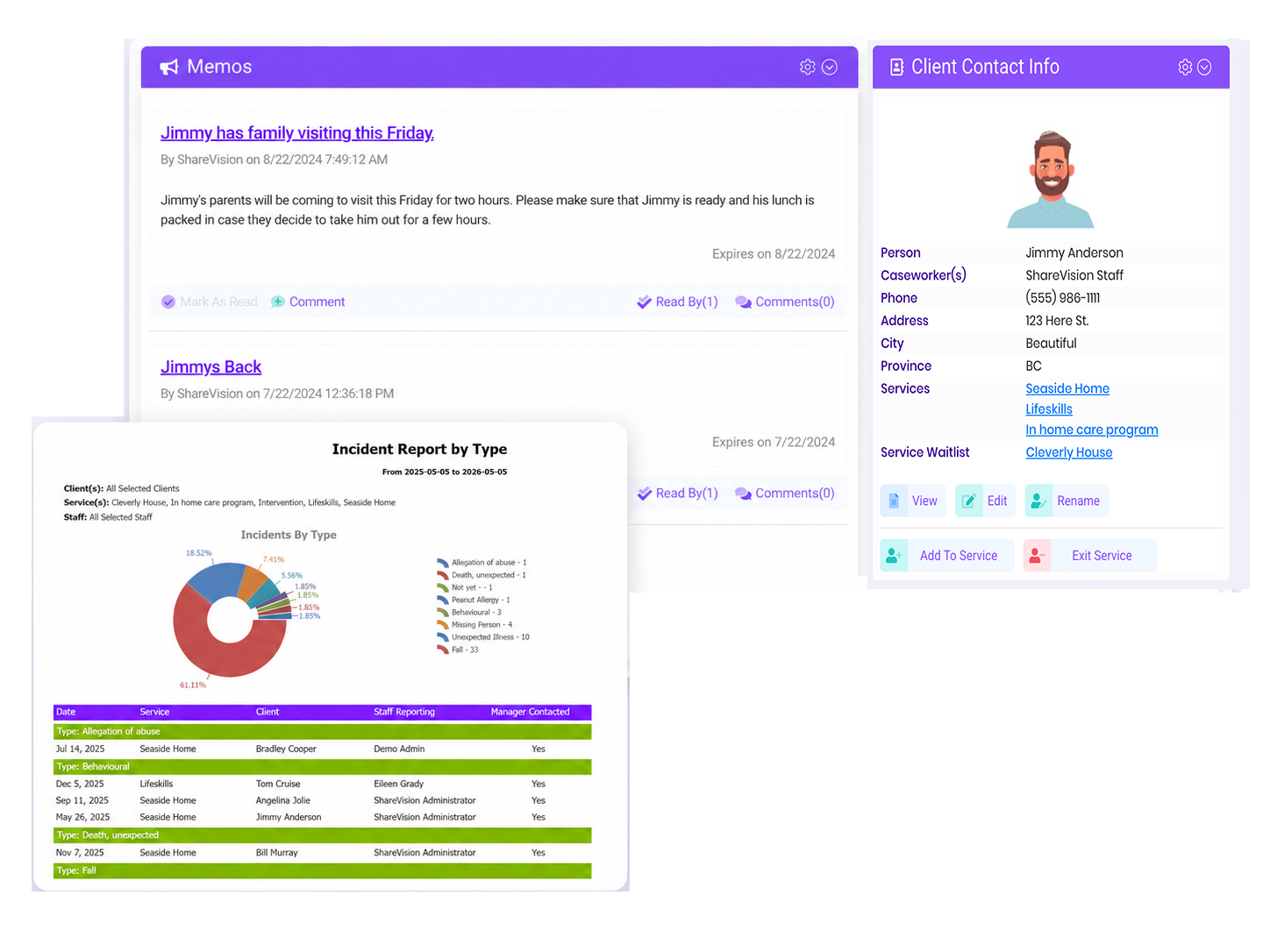
Optimize and centralize client information management with our tailored cloud-based program for non-profit organizations. ShareVision elevates your nonprofit team’s ability to manage constituent records, ensuring personalized client experiences. Use our platform to maintain detailed contact details, engage in actionable insights through effective online communication tools, and streamline back-office processes with our all-in-one solution.
Experience seamless task management by documenting interactions with clients, involving your entire team in development through shared calendars and documents. Our cloud-based solution provides the robust features you need to keep client service at a premium.
The best nonprofit CRM can make client tracking fast and easy!

Outcomes Tracking
Outcomes Tracking
Elevate monitoring of your client’s progress with our advanced analytics tools and flexible dashboards. ShareVision's CRM for nonprofits aids your team in capturing valuable insights at every engagement level, using custom fields to adapt to your mission-critical needs. Set and track client goals with our easy-to-use interfaces, ensuring your team remains focused on core outcomes.
Set goals for individual clients directly in the CRM software.
Align your nonprofit’s level of care with key performance indicators and development goals within our robust CRM platform. Our cloud-based CRM software fosters a culture of continuous improvement and ongoing training, pivotal for your organization's growth.
Discover what makes ShareVision the best nonprofit CRM to optimize outcomes tracking!

Super Secure
Super Secure
Our small non-profit organizations' platform deploys advanced encryption and customizable access settings for unmatched data protection. Embrace our all-in-one solution with multi-factor authentication and empower your team with control over their administrative tasks.
Tailored User Access for Nonprofit Teams
Define user permissions within our CRM to support your charitable organization's mission-critical operations, ensuring secure, strategic access to key performance indicators.
Daily Data Backups
Secure and restore your valuable insights with our automated daily backups, ensuring minimal disruption to your nonprofit's services.
Experience top-notch security with the best CRM for small nonprofit organizations

Works On Mobile
Works On Mobile
No App Needed
Our cloud-based CRM software adapts flawlessly to any device, providing your entire team with the tools they need for successful outreach and engagement without the need for an app.
Mobile Control for Nonprofit Administration
With flexible dashboards and custom fields, manage your engagement history and attendee tracking directly from any mobile device for effective online support.
Explore Simply ShareVision's CRM, designed to elevate your nonprofit to a new level of efficiency and impact.
Choose Simply ShareVision's CRM solution for mobile-ready functionality
Editable Forms
Editable forms
Key feature of our CRM for small nonprofits
Tailor your nonprofit's data collection with our form editor, boasting a library of standard forms. Enhance your social service organization’s customer service with this cloud-based program, adapting forms for high engagement levels and contact management.
Forms Editor
Create forms easily, adding fields for contact records to elevate customer experience. This key feature in our CRM for nonprofits streamlines task management and administrative processes.
Discover editable forms, a key feature of Simply ShareVision, the best CRM for small nonprofit organizations
Calendars and Files
Calendars and Files
Choose a simple, easy to use nonprofit CRM
Link seamlessly with your existing calendars and file-sharing systems. Our CRM simplifies event management, focusing on mission-critical needs and a superior customer service experience.
Manage Your Dashboard
Automatically update your dashboard with new client additions, keeping your nonprofit center organized. Tailor calendars and files to match your CRM for nonprofits, ensuring a deeper level of personalized outreach.
Experience seamless CRM integration with Simply ShareVision

Notifications
Notifications
A Highlight in our customer relationship management tool
Optimize your day operations using our notification manager to set up notifications for users based on complex triggers, including dates and times. Users can be notified in-app, via email, or even SMS (Twilio account req.)
Optimize workflow management in your small nonprofit
Use the ability to trigger alerts based on form field values to build complex workflows where a series of people are notified. Make it easy for your teams to complete the next step with notifications that link to the form that triggered it.
Explore automated notifications with the Simply ShareVision CRM

Built-in Wizards
Built-in Wizards
With Simply, adding clients, services, and forms to your site is a breeze. Our wizards guide you through even the most complex tasks. Here are some of the processes we've made easier:
- Adding clients
- Adding services
- Entering and exiting clients to/from services
- Adding contacts for clients
- Adding forms to a portal
- Setting up permissions for clients and services
Enhance your client journey, streamline your marketing efforts, and optimize your email campaigns with Simply ShareVision, the best CRM for small nonprofits. Offering affordable plans, Simply is your path to business intelligence, superior client services, and efficient data management.
Client Tracking
Optimize and centralize client information management with our tailored cloud-based program for non-profit organizations. ShareVision elevates your nonprofit team’s ability to manage constituent records, ensuring personalized client experiences. Use our platform to maintain detailed contact details, engage in actionable insights through effective online communication tools, and streamline back-office processes with our all-in-one solution.
Experience seamless task management by documenting interactions with clients, involving your entire team in development through shared calendars and documents. Our cloud-based solution provides the robust features you need to keep client service at a premium.
The best nonprofit CRM can make client tracking fast and easy!
Outcomes Tracking
Elevate monitoring of your client’s progress with our advanced analytics tools and flexible dashboards. ShareVision's CRM for nonprofits aids your team in capturing valuable insights at every engagement level, using custom fields to adapt to your mission-critical needs. Set and track client goals with our easy-to-use interfaces, ensuring your team remains focused on core outcomes.
Set goals for individual clients directly in the CRM software.
Align your nonprofit’s level of care with key performance indicators and development goals within our robust CRM platform. Our cloud-based CRM software fosters a culture of continuous improvement and ongoing training, pivotal for your organization's growth.
Discover what makes ShareVision the best nonprofit CRM to optimize outcomes tracking!
Super Secure
Our small non-profit organizations' platform deploys advanced encryption and customizable access settings for unmatched data protection. Embrace our all-in-one solution with multi-factor authentication and empower your team with control over their administrative tasks.
Tailored User Access for Nonprofit Teams
Define user permissions within our CRM to support your charitable organization's mission-critical operations, ensuring secure, strategic access to key performance indicators.
Daily Data Backups
Secure and restore your valuable insights with our automated daily backups, ensuring minimal disruption to your nonprofit's services.
Experience top-notch security with the best CRM for small nonprofit organizations
Works On Mobile
No App Needed
Our cloud-based CRM software adapts flawlessly to any device, providing your entire team with the tools they need for successful outreach and engagement without the need for an app.
Mobile Control for Nonprofit Administration
With flexible dashboards and custom fields, manage your engagement history and attendee tracking directly from any mobile device for effective online support.
Explore Simply ShareVision's CRM, designed to elevate your nonprofit to a new level of efficiency and impact.
Choose Simply ShareVision's CRM solution for mobile-ready functionality
Editable forms
Key feature of our CRM for small nonprofits
Tailor your nonprofit's data collection with our form editor, boasting a library of standard forms. Enhance your social service organization’s customer service with this cloud-based program, adapting forms for high engagement levels and contact management.
Forms Editor
Create forms easily, adding fields for contact records to elevate customer experience. This key feature in our CRM for nonprofits streamlines task management and administrative processes.
Discover editable forms, a key feature of Simply ShareVision, the best CRM for small nonprofit organizations
Calendars and Files
Choose a simple, easy to use nonprofit CRM
Link seamlessly with your existing calendars and file-sharing systems. Our CRM simplifies event management, focusing on mission-critical needs and a superior customer service experience.
Manage Your Dashboard
Automatically update your dashboard with new client additions, keeping your nonprofit center organized. Tailor calendars and files to match your CRM for nonprofits, ensuring a deeper level of personalized outreach.
Experience seamless CRM integration with Simply ShareVision
Notifications
A Highlight in our customer relationship management tool
Optimize your day operations using our notification manager to set up notifications for users based on complex triggers, including dates and times. Users can be notified in-app, via email, or even SMS (Twilio account req.)
Optimize workflow management in your small nonprofit
Use the ability to trigger alerts based on form field values to build complex workflows where a series of people are notified. Make it easy for your teams to complete the next step with notifications that link to the form that triggered it.
Explore automated notifications with the Simply ShareVision CRM
Built-in Wizards
With Simply, adding clients, services, and forms to your site is a breeze. Our wizards guide you through even the most complex tasks. Here are some of the processes we've made easier:
- Adding clients
- Adding services
- Entering and exiting clients to/from services
- Adding contacts for clients
- Adding forms to a portal
- Setting up permissions for clients and services
Enhance your client journey, streamline your marketing efforts, and optimize your email campaigns with Simply ShareVision, the best CRM for small nonprofits. Offering affordable plans, Simply is your path to business intelligence, superior client services, and efficient data management.

What our customers are saying
-
“As leaders, we are faced with making challenging decisions. More so now than ever! COVID-19 has shaken the world and impacted each of us. One tough decision that I had to make was shutting down our administrative offices and re-deploying all of our leadership staff to work from home. Thanks to ShareVision, this has been seamless – the information flows and the work continues!”
Brandon Arnett Executive Director -
“As a new service provider, we know from the outset that we wanted to select a system that could grow with us. Given the intuitive nature of system design, adoption has been a breeze. New team members are consistently able to get up and running in a matter of days. Support is also fantastic, we’ve engaged the product team on a few projects which have gone very smoothly. For day to day support the community forum is more than enough for our needs. Can’t recommend ShareVision enough! We foresee the system remaining a core part of our infrastructure for years to come.”
Dan Goldstein Director -
“ShareVision transformed how we collect and use information. The knowledge base of the ShareVision Product Experts, about their product and the community living sector saved us hundreds of hours and unquantifiable dollars as we designed and implemented our site. It was surprisingly simple to learn and the Sharevision Team was infinitely patient as they trained a non-technical person how to administer our site and develop new content.”
Gina Rowan Director of Administration -
“Our organization went from binders full of paper and notes to bringing it all online with Sharevision. Though the task seemed daunting, the Sharevision team was with me the whole way to make sure I was able to set up the system exactly how I wanted it. Whenever I had a question, Sharevision support got back to me within an hour with detailed instructions. We have now been using Sharevision for almost two years now, and it was one of the best decisions I have made.”
Andrew Phippen Executive Director -
“CISS has been using Share Vision to manage our program's activities and employee information since 2009. When we first started with Share Vision, we used Version 3 and a couple of years ago moved over to Version 4. Using this system has allowed our organization to move towards a paperless system, and during COVID, we had to pivot to this method very quickly. We were successful in the transition because of the support and education we received from the Break Water Design team and our own internal Share Vision champions.”
Shari Mahar Executive Director -
“Since we began using ShareVision three years ago, we have invested a great deal of time and resources further developing our ShareVision database with customized reports, specific notifications and alerts and programming that has revolutionized the way we work. All information is exportable to MS Office programs and templates can be created in Word and Excel for use in ShareVision. The built-in coding for multiple levels of security and privacy gives us the flexibility to offer up only the information necessary for our employees to do their work and ensures information regarding the people we support is kept private and confidential.”
Nancy Vermeulen Administrative Officer (retired) -
“We researched data management systems for a year before choosing ShareVision. It was, comparatively, a “no-brainer” and we now use ShareVision for all our programs and residences, HR, surveys, statistical analysis, and even data management and communication with external partners.”
Nathalie Callender Previous Executive Director
Frequently Asked Questions About ShareVision
What is human services case management software?
Human services case management software gives your organization one place to manage client information, services, documentation, programs, outcomes, staff workflows and reporting.
Instead of relying on paper files, spreadsheets and disconnected systems, your team can access the information they need through a centralized platform.
ShareVision is built specifically for nonprofits, social service agencies and community-based organizations that provide direct services to people.
What types of organizations use ShareVision?
ShareVision is designed for human services and community service organizations that need to manage clients, programs, services and documentation.
This can include organizations working in areas such as:
- Developmental and intellectual disabilities
- Community living
- Child and youth services
- Behavioural and mental health services
- Employment and vocational programs
- Housing and residential services
- Shelters and supportive housing
- Family and community services
- Other nonprofit and social service programs
ShareVision can support organizations operating a single program as well as agencies managing multiple services, locations and facilities.
What can we manage in ShareVision?
ShareVision brings many parts of your organization's day-to-day work into one system.
Depending on how your organization configures ShareVision, you can manage:
- Client profiles and records
- Case notes and documentation
- Programs and services
- Service enrollment and history
- Waitlists
- Goals and outcomes
- Assessments and surveys
- Attendance and schedules
- Forms and documents
- Facilities and residences
- Staff information
- Alerts and reminders
- Policies and procedures
- Reports and organizational data
Your organization can configure the system around the information and processes you already use.
Is ShareVision a donor management or fundraising CRM?
No. ShareVision is primarily designed for organizations that deliver human and social services.
Its core purpose is to help your team manage the people you support, the services you provide, your documentation, programs, outcomes and internal workflows.
If your main requirement is fundraising campaigns, donation processing or donor relationship management, ShareVision is not positioned as a traditional fundraising CRM.
Can ShareVision replace spreadsheets and paper files?
ShareVision can help your organization move client, program and service information out of spreadsheets, paper forms and disconnected files and into a centralized system.
Electronic forms, centralized client records and searchable information can reduce duplicate data entry and make it easier for authorized staff to find current information.
Existing electronic data can also be imported as part of your implementation process.
Can we customize our forms and workflows?
Yes. ShareVision includes editable electronic forms and tools for creating forms around your organization's processes.
You can customize fields, build forms for different programs and collect the information your organization needs.
This can include intake information, assessments, case notes, service documentation, incident records, surveys, progress information and other program-specific records.
Your organization does not have to force every program into the exact same documentation process.
Can ShareVision manage multiple programs and services?
Yes. Programs, services and facilities can be managed separately within ShareVision while remaining connected to the same central system.
You can track which clients participate in each service, enrollment history, start and exit dates, waitlists, schedules, records and other program-specific information.
This can make ShareVision useful for organizations that operate several programs, residences, facilities or service locations.
How does ShareVision help with outcomes tracking?
ShareVision lets your organization connect service delivery with measurable client and program outcomes.
You can track information such as:
- Individual goals
- Program goals
- Progress over time
- Outcome indicators
- Influencing factors
- Assessments
- Pre- and post-service surveys
- Service participation
- Program-level results
This gives program managers and leadership better information for evaluating services, identifying trends and reporting results.
Can ShareVision help with funder and management reporting?
Yes. ShareVision includes reporting tools that let your organization use the information already being collected through day-to-day service delivery.
Reports can be filtered and organized around clients, programs, services and other information your organization tracks.
Instead of manually combining information from multiple spreadsheets and paper records, your team can build reports from centralized operational data.
Can different staff members have different access permissions?
Yes. ShareVision supports permissions-based access.
Your organization can control which information different users or staff groups can access based on their responsibilities.
This helps organizations give staff access to the information they need without providing every user with access to every client, program or record in the system.
Can frontline staff use ShareVision on mobile devices?
ShareVision can be accessed from devices staff use while working across programs, facilities and service locations.
This allows authorized staff to access information, review records and complete documentation without having to rely solely on a computer at a central office.
For organizations with frontline, residential, community-based or mobile teams, this can make documentation easier to complete closer to the point of service.
Can ShareVision track client enrollment and service history?
Yes. ShareVision can track which programs and services each client participates in and maintain a history of that involvement.
Organizations can record information such as referral dates, waitlist status, program start dates, exit dates and previous enrollment.
This gives staff a clearer record of each person's service history and helps managers understand program participation over time.
Can ShareVision manage waitlists?
Yes. Organizations can use ShareVision to track clients waiting to enter programs or services.
Waitlist information can be connected with program enrollment data so staff can see who is waiting, current service participation and changes in program availability.
Can we keep documents and records with the appropriate client or program?
Yes. Forms, documents, surveys and other records can be stored alongside the relevant client, service, program or facility information.
This gives staff a centralized place to find information instead of searching across paper files, shared drives, email attachments and separate spreadsheets.
How difficult is it to move our existing information into ShareVision?
Your organization does not need to start from scratch.
Existing electronic data such as client, staff and program information can be prepared for import into ShareVision. Existing documents can also be uploaded and attached to the appropriate areas of the system.
The amount of migration work depends on how your current information is stored, its format and how much historical data you want to bring into the new system.
Does ShareVision work for smaller organizations?
Yes. ShareVision can be used by smaller organizations as well as agencies managing larger numbers of clients, staff, programs and facilities.
The main consideration is not simply the size of your organization. It is how much client, service and operational information your team needs to manage.
If spreadsheets, paper files or disconnected systems are making your work harder, a centralized case management platform can provide a more structured way to manage that information.
How is ShareVision different from a general-purpose CRM?
Most general-purpose CRMs are built around sales pipelines, customers, marketing or fundraising.
ShareVision is built around human services.
The system focuses on clients, programs, services, documentation, outcomes, staff workflows and reporting. That means your organization starts with a platform designed around service delivery rather than adapting a sales or donor-management system to fit human services.
Can ShareVision be configured around the way our organization already works?
Yes. ShareVision provides configurable forms, programs, services, permissions, reports and other tools that can be adapted to your organization's processes.
Different human services organizations collect different information and operate different programs. ShareVision gives your team flexibility to configure the system around those requirements instead of relying on a rigid, one-size-fits-all structure.
How do we know if ShareVision is right for our organization?
ShareVision may be a good fit if your organization needs a better way to manage client records, services, programs, documentation, outcomes and reporting.
It may be particularly useful if your team currently struggles with:
- Paper-based documentation
- Multiple spreadsheets
- Duplicate data entry
- Information stored in different systems
- Time-consuming reporting
- Difficulty finding current client information
- Managing several programs or services
- Tracking goals and outcomes
- Giving different staff appropriate access to information
The best way to assess the fit is to see ShareVision using examples that reflect your organization's actual programs, documentation and reporting needs.
Can we see ShareVision before making a decision?
Yes. You can request a ShareVision demo to see how the platform manages clients, services, programs, documentation, outcomes and reporting.
A demo also gives your team the opportunity to discuss your current processes, the systems you want to replace and the way ShareVision could be configured for your organization.
See how ShareVision can support your organization. Request a demo today.